The latest features and improvements across Zentra apps.
See what’s new and how it helps you run your Shopify store.
Dates marked “Recorded” identify earlier updates in our product history.
Their exact release dates haven’t been confirmed.
Released Zentra Announcement BarNew
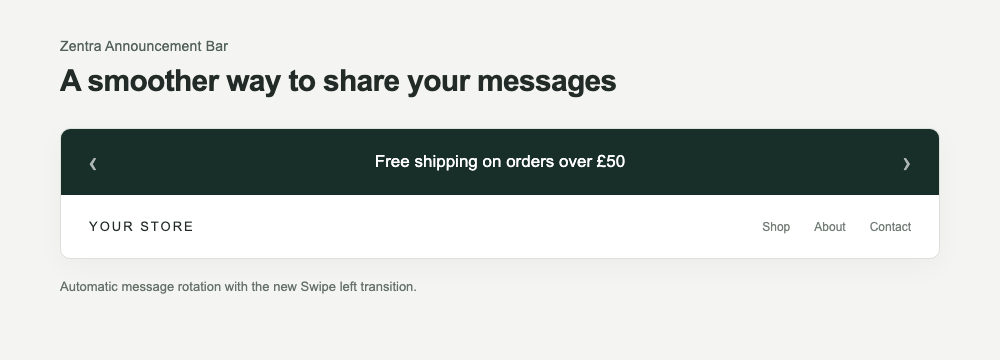
Swipe animation for rotating messages
Give automatically rotating announcements a smooth transition with Swipe left:
the current message slides left as the next enters from the right.
With auto-rotate enabled, choose Rotation → Transition → Swipe left
in the app’s customizer. Existing bars keep their current behaviour unless you select it.
Manual arrows still switch instantly, and marquee scrolling remains a separate option.
Reconstructed storefront showing the actual Swipe left animation.
Released Zentra Announcement BarNew
Share your feature ideas
Submit feature requests directly inside the app and browse ideas shared by other merchants. Requests appear immediately in the shared list; voting isn’t available.
Released Zentra Announcement BarImprovement
A better-fitting preview on smaller screens
Fixed an issue where marquee scrolling could stretch the Customizer beyond the available screen width.
Recorded Zentra Announcement BarImprovement
See your messages in action
Live Preview now supports Previous/Next navigation, automatic rotation and continuous marquee scrolling. Messages keep their supporting text together, and navigation arrows stay hidden during marquee mode.
Recorded Zentra Announcement BarImprovement
More ways to match your branding
Create gradient backgrounds using two colours and an adjustable angle. Clickable bars also gain configurable hover-underline options.
Recorded Zentra Announcement BarImprovement
A quieter dashboard
Dismiss Quick Start guidance and review reminders when you no longer need them. Your preference is remembered.
Recorded Zentra Announcement BarImprovement
Style your navigation controls
Adjust the appearance of message-navigation arrows with background, outline, corner and size settings.
Recorded Zentra Announcement BarImprovement
Add supporting text to every message
Each of your five announcements can now include optional secondary text. The Customizer also gains Back/Next navigation and an Add message button for a simpler editing experience.
Recorded –Zentra Announcement BarImprovement
More control over borders and country selection
Customise full or horizontal borders with colour, thickness and line-style options. Find target countries more easily using a searchable picker with flags.
Recorded Zentra Announcement BarNew
Choose specific product pages
Select the products where an announcement should appear for more focused promotions.
Recorded Zentra Announcement BarImprovement
Pick up where you left off
Quick Start now remembers your completed setup steps when you return to the app.
Recorded –Zentra Announcement BarNew
Understand how shoppers interact with your bar
View clicks and click-through rate alongside impressions to help assess engagement with your announcements.
Recorded Zentra Announcement BarNew
Show announcements in selected countries
Limit an announcement to your chosen countries for more relevant regional messaging.
Recorded –Zentra Announcement BarImprovement
Scrolling messages and more countdown control
Display messages in a continuous marquee with optional hover pause. Countdown settings also expand with a start time, custom colours and options to hide the timer or bar when it ends.
Recorded Zentra Announcement BarImprovement
An easier Customizer on smaller screens
The editor switches to a single-column layout, placing the preview beneath your settings.
Recorded Zentra Announcement BarNew
Choose where your bar appears
Control desktop and mobile visibility, and target your home page, product pages or collection pages.
Recorded –Zentra Announcement BarImprovement
Keep announcements visible while scrolling
Sticky positioning keeps the bar visible as shoppers scroll, with improved positioning alongside sticky theme headers.
Recorded Zentra Announcement BarNew
More control from the in-app Customizer
Configure your bar with a live preview, Active/Draft control, font styling, button colours, countdowns, scheduling, positioning and whole-bar links.